 AI Hub
Collecting payments becomes easy
Automated invoicing
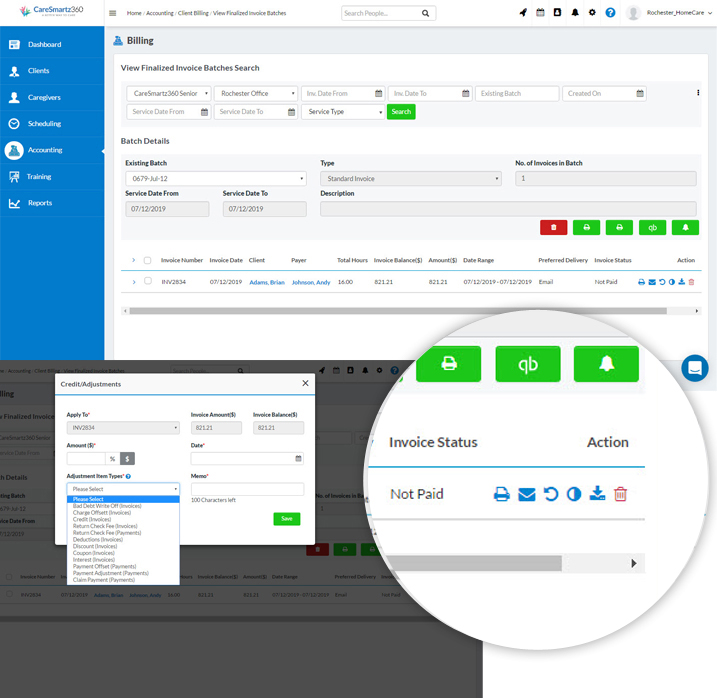
Invoicing becomes easy with the Batch feature. You can make a New Batch by specifying the criteria you want. The Batch is like a folder of invoices that can be processed and sent at the same time.

Convenient Invoicing
Multiple actions with invoices to help you keep track
Invoice batches that are finalized can be printed out as a PDF, exported to QuickBooks or you can send Invoice Notifications to the payers. This is a great time-saver for you and helps in maintaining invoices without pain.

Integration with QuickBooks
Export your invoices to QuickBooks easily.
If you have QuickBooks installed, exporting invoices to QuickBooks for further action is easily done.

Revise invoices easily
Adjust the invoice, provide discounts, get total control.
Each invoice in a batch has icons in the row from which you can perform multiple functions: email, adjust, discount, or delete.
Got a Question?
Why do I need to create a batch to process invoices?
This is just one of the features put in to add convenience since batches can be sorted by date, service and type of payments and processed together to save time.
How is invoice generation automated?
The system will calculate payments based on caregivers’ rates fed into it and the total number of hours spent on the shifts. Of course, this means that clock in and clock out should be done properly.
What if there is more than one payer? Will there be multiple invoices?
If there is more than one payer, the system will create more invoices -one for each payer-according to how the payment is divided.
What about holiday rates of caregivers?
Special rates for working over holidays etc. can be factored into the homecare management system and the invoice will reflect that.
Can I get invoices into QuickBooks?
Yes, we do have an option to export invoices to QuickBooks so that the software does not disrupt your existing accounting routine.
Can I send notification for invoices only in a particular batch?
Yes, from the finalized invoice page, you can select all or just some of the invoices to print, export or send notification that the invoice is ready to be paid.